Wondering why Amazon rejects new seller accounts? Here are the 15 most common verification mistakes, why they trigger rejection, and how to avoid them so you can get approved with fewer delays.
Getting your new Amazon seller account approved can feel like a stressful, frustrating ordeal. If you’re frantically searching “why Amazon rejects new seller accounts,” on search engines, please, take a deep breath, you are absolutely not alone in this anxious boat.
More often than not, it’s those tiny, annoying details you totally overlook that end up causing the biggest headaches at the finish line.
The truth is, Amazon is incredibly strict about its verification process, because they are a massive global marketplace constantly targeted by fraud attempts.
To protect themselves, they put every new seller through rigorous checks. They put every new seller through the wringer with some intense checks.
They verify who you are (KYC), confirm your identity and address, check your bank and tax details, sometimes even jump on a video call, and do a whole lot of secret risk analysis behind the scenes.
The common hang-up isn’t the major requirements. It’s the tiny, easily overlooked inconsistencies such as a shortened name on one document, a slightly different address format on another, a bank statement missing the official logo, or logging in via a VPN while traveling.
This guide is designed to walk you through 15 specific verification mistakes that commonly cause Amazon seller account verification to fail.
We’ll explain why they happen and what to do instead.
Ready to dive in? Let’s go.
How Amazon’s Seller Verification Process Actually Works
Let’s first take a look at Amazon’s seller verification process:
Identity Verification
Amazon requires a government-issued photo ID (such as a passport, national ID, or driver’s license) to confirm the identity of the primary contact person.
Additionally, Amazon may request live verification steps, such as a selfie, video call, or phone call. Amazon provides guidance in their Seller Forums on preparing for a video verification call, including ensuring a quiet space, having original and valid documents ready, and making sure the information is legible.
The purpose of these steps is to verify that you are a real person and that your identity matches the documents provided, preventing the use of fake or synthetic identities.
Address Verification
Amazon requires concrete proof of your address to verify your account. This typically involves submitting official documents such as utility bills, bank statements, or certain government-issued documents, depending on your geographic location.
The critical requirement: The name and address you registered in your Amazon seller account must perfectly match the information displayed on the document you upload.
Amazon explicitly details this identity, address, and business verification process, along with the required documents, in their global verification guidance.
What This Means for You:
- Zero Tolerance for Discrepancies: “Close enough” is not acceptable. Any inconsistencies, such as abbreviations (e.g., “St.” instead of “Street”), missing unit or apartment numbers, or minor formatting differences (e.g., how the date is written), can flag your document and trigger an account review or rejection.
- Avoid Unnecessary Delays: While small discrepancies don’t always lead to rejection, they occur frequently enough to cause significant frustration and delay your account activation, potentially ruining your week or delaying your launch. Ensure absolute consistency to guarantee a smooth verification process.
Banking Verification
Amazon may request bank or credit card statements during the identity verification process or to confirm your setup, as their global verification guidelines specifically list these as acceptable documents.
This is because:
- Bank ownership is a factor in their risk assessment.
- Any name discrepancies are strictly penalized since a clear money trail is essential for their compliance.
Tax Verification
A common mistake sellers make during Amazon’s account verification is inadvertently invalidating their tax forms.
Amazon’s documentation, including the Tax Information Interview documentation and the U.S. Tax Interview FAQ, explicitly warns that the use of misspellings or incorrect Tax Identification Numbers (TIN) will invalidate the completed tax form.
Therefore, sellers must ensure the utmost accuracy when entering their tax information.
Algorithmic Risk Scoring
During onboarding, Amazon doesn’t only verify that you submitted documents. It evaluates whether the full application is low-risk.
At Amazon’s scale, verification is triage. Most applications are screened by automated systems first. Only a subset gets escalated to manual review, typically when the system detects inconsistencies or patterns that correlate with fraud, account farming, or prior enforcement.
That’s why small discrepancies matter.
📌 Unsure about how to set up your Amazon FBA business? Here’s a detailed read.
A minor name variation or an address formatting mismatch can be innocuous in isolation, but in fraud datasets those are common features. The model doesn’t treat them as “small.” It treats them as risk indicators.
This is also why Amazon seller account approval can feel random. It generally isn’t. It’s non-transparent.
Amazon won’t disclose the full risk rationale, and the notifications often describe the outcome, not the specific signal combination that triggered it.
Why Amazon Rejects New Seller Accounts: Top 15 Verification Mistakes
Let’s unravel the top verification mistakes that get new seller accounts rejected:
1. Name Mismatch Across Identity, Banking & Tax Records
The most frequent reason new Amazon seller accounts are rejected during verification is an inconsistency in the legal name used across different documents and systems.
This issue isn’t typically a deliberate attempt at deception, but rather a result of minor administrative discrepancies that collectively fragment your identity in Amazon’s automated verification systems.
Common scenarios leading to mismatch:
- Missing Middle Names: A government ID (like a passport) includes a full middle name, but the bank account or Seller Central profile omits it.
- Use of Initials: The Seller Central profile uses initials (e.g., “J. A. Smith”), while the legal documents use the full name (“John Allen Smith”).
- Entity vs. Owner Name Confusion (Common for LLCs): This often happens with Single-Member LLCs. The tax interview is completed using the formal Legal Entity Name (tied to the EIN), but the bank account or Seller Central registration is mistakenly set up under the Owner’s Personal Name.
Why This Causes Rejection:
Amazon’s automated Know Your Customer (KYC) compliance systems do not interpret ambiguity or nuance. They look for a perfect, exact match.
Any variation, even a missing middle initial or the use of “Co.” instead of “Company”, is flagged as a Name Mismatch or Identity Fragmentation.
When the legal name associated with your Taxpayer Identification Number (TIN/EIN) does not precisely align with the name on your Seller Central account and bank details, it causes the verification process to fail.
Here’s what you need to do to avoid this mistake:
You must establish and enforce a single, Canonical Legal Name String.
This name should be the exact, official name as it appears on your primary government registration document (e.g., the EIN Confirmation Letter, or your passport for an individual).
Enforce this canonical name string across all systems:
- Amazon Seller Central Account Profile
- Bank Account Title (The registered name on the bank statement)
- Credit Card Name (The name on the card used for billing)
- Tax Interview (KYC) Details
2. Low-Quality Or Incomplete Identity Documents
Amazon frequently rejects new seller applications not due to a false identity, but because the submitted identity documents fail basic quality or completeness checks.
These failures are often caught by an automated verification system before a manual reviewer even sees them.
Why documents are rejected:
- Cropped or Partial: The document’s edges are cut off, obscuring information.
- Poor Quality: The image is blurry, overexposed, or repeatedly compressed (a “degraded file”).
- Expired: The identification document is no longer valid.
The Bigger Underlying Problem:
Low-quality or incomplete documents cannot be reliably processed by Amazon’s automated systems, triggering an immediate rejection.
Furthermore, any file manipulation, even innocent attempts to “clean up” a scan or compress a large file, is flagged as potential tampering.
This issue is common when document handling is delegated to junior staff or files are compressed to meet strict upload limits.
Protocol for Submission Success
Implement a strict compliance protocol for all identity document submissions such as:
- Full-Frame: The photo/scan must show the entire document with all four edges clearly visible.
- High-Resolution & No Editing: Submit the initial, untouched file (scan or photo). Do not crop, compress, digitally alter, or use poor-quality copies.
- Valid & Current: Use only identification documents that are current and unexpired.
3. Address Inconsistencies Between Documents And Profile
Mismatched addresses are a frequently overlooked, yet common, cause of Amazon seller verification failure.
Examples of address discrepancies:
- Abbreviations: Using “Suite 410” instead of the document’s “Ste 410,” or vice versa.
- Missing Details: Omitting an apartment, unit, or floor number.
- Shortened Words: Using “St” instead of “Street,” or “Rd” instead of “Road.”
- Format Differences: Varying formats for the postal or zip code (e.g., with or without the 4-digit extension).
Amazon’s identity and address verification process is extremely strict. The address entered on your Seller Central profile must be a literal, character-for-character match to the address on your proof-of-address document (e.g., bank statement).
If the profile entry does not perfectly mirror the document, the system will automatically flag the account for review or rejection.
Here’s what you should do:
Treat your proof-of-address document as the single, authoritative source. Copy the spelling, structure, capitalization, and formatting of the address exactly into your Seller Central profile.
Do not make any changes, even if you believe a change is technically more correct or standard.
4. Risky Registration Environment (IP And Device Signals)
Amazon doesn’t just look at your documents; it also assesses the environment you use to submit your application.
This assessment includes:
- Your device’s digital footprint (fingerprinting)
- The reliability of your network
- The consistency of your location during the verification process
Applying from environments like public Wi-Fi, shared coworking spaces, agency-managed networks, consumer VPNs, or frequently changing locations can raise a red flag internally.
While using a VPN isn’t automatically disqualifying, any volatility (instability or rapid changes) during the identity verification phase significantly increases the chance that your account will be flagged as resembling known fraud patterns.
Amazon uses machine learning to prevent large-scale fraudulent account creation. These systems analyze patterns, not your intent.
High network instability or using overlapping devices are common traits in fraudulent “account farming” operations, so the system weighs these factors heavily.
During the Amazon seller account approval process, make sure you follow these tiny practices:
- Use one dedicated device.
- Use one stable network (like your home or office connection).
- Temporarily disable any VPN for the registration period.
- Avoid logging in from different cities or countries mid-process.
- Limit access to the account during verification.
Treat onboarding as a controlled compliance event, not a casual sign-up.
Your goal is simple: eliminate any environmental uncertainty while Amazon’s system is scoring your identity.
Once your account is approved, you will have much more operational flexibility.
5. Multiple Accounts or Linkage Signals
Amazon strictly limits businesses to one Seller Central account per region.
A second account is only permitted if a company can provide documented proof of a legitimate business need, such as managing distinct brands or operating separate retail entities.
Stay cautious: If one account is flagged for poor performance or a policy violation, Amazon’s advanced algorithms are designed to link and penalize any associated accounts, which could lead to the suspension of all of them.
Amazon’s system actively detects common ownership or management structures by looking for:
- Shared Devices: Accessing different Seller Central accounts from the same computer, phone, or tablet.
- Shared Networks: Using the same IP address or Wi-Fi network for multiple accounts.
- Shared Identity Fields: Using identical names, addresses, emails, or phone numbers across different account registrations.
- Shared Banking Details: Using the same credit card for seller fees or the same bank account for disbursements on multiple accounts.
Why This Is a Problem:
- Multi-brand Operators: Businesses may incorrectly set up a new account for every brand, instead of managing multiple brands within a single, approved account.
- Agencies: Third-party agencies managing various client accounts often do so from shared office infrastructure (devices and network), inadvertently creating linkage signals.
- Testing/Backup Accounts: Entrepreneurs sometimes create “just-in-case” or test accounts without official approval, which is a direct violation.
Here’s what you should do to avoid this mistake:
Before creating any second account, clearly document the compelling, legitimate business reason for the separation and secure explicit approval from Amazon (if required by your region/situation).
If you manage multiple entities (e.g., an agency or holding company), keep each Seller Central account fully separate with dedicated devices, unique IPs/VPNs, and distinct banking and contact details.
6. Incorrect Business Structure Selection
This particular rejection occurs when the business structure you select in the Amazon application does not accurately reflect your legal status, supporting documentation, and tax records.
Many applicants incorrectly treat the “Business Structure” drop-down as a casual choice rather than a mandatory declaration of their legal and tax identity.
Amazon strictly requires that your selected structure aligns perfectly with your official legal paperwork, banking information, and how you file taxes.
Examples of Misalignment:
- Selecting “Individual” while operating as a formal company (e.g., LLC, Corporation)
- Selecting “Business” without possessing the necessary legal entity documentation
Here are some ways to avoid this mistake:
- Finalize Your Entity Structure: Before initiating the Amazon Seller application, legally form your business and obtain all required formation documents and tax IDs (like an EIN) if you intend to apply as a “Business.”
- Ensure Documentation Consistency: Verify that your formation documents, EIN letter, and bank account details match the exact business name and structure listed in your Amazon application.
7. Bank Account Ownership Mismatch
Amazon often rejects accounts where the bank account holder name doesn’t exactly correspond to the Seller Central entity.
Common mismatches leading to rejection:
- Slight Name Differences: Minor discrepancies between the official entity name and the bank account title.
- Missing Bank Identification: Bank statements that lack clear, identifiable branding (name or logo).
- International Banking Issues: Alignment problems with cross-border banking setups.
To ensure a successful bank verification, take care of the following:
- The legal entity name on your bank account title must precisely match the name registered in Seller Central.
- Your bank statements must clearly show the bank’s name or logo.
- The bank account ownership must be clearly and undeniably linked back to the registered seller entity.
8. Credit Card Authorization Failures
During registration, Amazon typically runs a small, temporary authorization on the card (think low-value verification holds) to confirm two things: the card is valid, and the issuer will approve Amazon as a merchant.
If that authorization fails, even once, Amazon reads it as a reliability risk because that same card is used for marketplace fees and account-level charges.
In addition, low available credit can also cause a decline if the corporate limit is tight or shared across teams. Amazon won’t evaluate your internal context (expense policy, risk controls, treasury decisions). It only sees a decline.
The practical mitigation is quite straightforward:
Use a primary corporate credit card, enable e-commerce and international transactions, allow small Amazon authorization holds, and keep enough available credit before onboarding.
9. Tax Interview Errors (TIN, EIN, Form Selection)
Amazon treats the tax interview as an identity match, not a questionnaire.
The data you enter is cross-checked against the tax authority record tied to the TIN/EIN (for U.S. entities, that’s the IRS record reflected on your EIN confirmation).
If Amazon can’t reconcile the legal name + TIN/EIN combination exactly, the tax profile fails validation and onboarding may stall.
Common issues triggering failed verification:
- TIN/EIN Errors: Transposed digits in the Taxpayer Identification Number (TIN) or Employer Identification Number (EIN).
- Incorrect Name: Using a brand/trade name instead of the exact legal name tied to the EIN.
- Wrong Form Selection: Choosing the incorrect tax form (e.g., W-9 instead of W-8BEN-E).
- Misclassified Entity: Incorrectly identifying the seller as an individual, disregarded entity, corporation, or partnership.
- Delegation: The task is often delegated to staff who do not cross-check entries against the original IRS confirmation notice (for U.S. entities) or official tax documentation.
Here are a few ways to avoid tax related errors:
- Retrieve Source Document: Pull the original EIN confirmation document or equivalent tax record.
- Enter Legal Name Exactly: Enter the legal name character for character as it appears on the official document.
- Confirm Entity Classification: Confirm the entity type before selecting the tax form path. If the classification is unclear, have finance/tax counsel validate it rather than guessing.
- Review for Typos: Do a line-by-line review before submission. One digit error or a missing “LLC” is enough to trigger validation failure and slow down Amazon seller account approval.
10. Poorly Executed Video Verification
Amazon often requires a live video call as the final step to verify a new seller account’s identity and business legitimacy.
Failing this check is a common reason for application rejection or suspension.
Amazon sometimes requires a live video call as the final step in onboarding. This is not a casual confirmation.
It’s a real-time identity verification where a human reviewer confirms that the person behind the account matches the documents submitted and that the business appears legitimate.
Failure at this stage is a common reason applications are rejected or accounts are suspended during registration.
Primary Failure Points in Video Verification
- Document Issues: Not having the original physical identification documents (ID, passport, utility bills, business licenses) ready to show on camera. Digital copies are often rejected.
- Inconsistent Information: Providing verbal answers that contradict the details submitted in the initial application or on the supporting documents.
- Technical Flaws: Subpar lighting, background noise, poor camera quality, or an unstable internet connection that prevents the Amazon agent from clearly seeing the person and their documents.
Here are a few ways to prepare well for an audit or regulatory interview:
- Professional Environment: Use a quiet, well-lit, and professional setting with a neutral background.
- Document Integrity: Ensure all original, physical documents cited in the application are laid out and immediately accessible.
- Designated Speaker: Nominate one, single individual to speak, and make sure that person is the account owner or a designated representative who is fully prepared to articulate the business details accurately and concisely.
- Technical Reliability: Test the internet connection, camera, and microphone beforehand to eliminate technical failures.
11. Weak Or Disposable Email Identity
Using newly created emails or inboxes shared among multiple Amazon accounts significantly increases the chance of Amazon linking those accounts together, which is often a cause for rejection.
Why This Happens
Agencies, focused on quick setup, often create emails rapidly, while some brands create new, temporary email addresses for various operational needs.
To mitigate this risk, always use an established, long-term email address that is officially controlled by your corporation or business for your Seller Central account ownership.
Additionally, implement and maintain strict internal controls over who has access to this crucial email address.
12. Edited Or Manipulated Documents
Amazon rejects verification documents that appear altered (e.g., cropped bank statements, edited PDFs, stitched pages) because modified documents are often associated with fraud.
For strict authenticity, Amazon’s process flags any file that looks edited as a risk signal, which can lead to verification failure.
Here’s what you can do instead:
✔️ Always submit the complete, unedited document exactly as issued, ensuring the full page and margins are included.
✔️ If the document is unclear, rescan it at a higher resolution.
✔️ If the file size is too large, adjust your original scan settings and rescan.
✔️ Do not edit the PDF or image file afterward.
13. Inconsistent Business Activity Description
Amazon often rejects new seller accounts when it detects inconsistencies during the onboarding process.
Changes in product category, vague business descriptions, or inconsistent supply chain details can trigger flags because they often point to high-risk activity, such as account farming or poor business controls.
To avoid rejection, adhere to these key practices:
- Define your initial business parameters clearly before applying. This includes your intended product category, sourcing model, and legal entity structure.
- Ensure perfect consistency in all information submitted throughout the account approval process.
You are free to safely expand your business scope and product offerings once your account is approved.
14. Cross-Border Structural Misalignment
Amazon frequently delays or outright rejects applications when the foundational elements of a cross-border business setup don’t align perfectly.
These core elements are your country of residence, specific Amazon marketplace you are registering for (e.g., Amazon.com, Amazon.co.uk), tax identification form you submit (W-8BEN, W-9, etc.), and your banking/payout system.
Common Causes For Rejection Include:
- Registering for the U.S. marketplace while submitting tax documentation that reflects a different residency or tax status
- Operating a legal entity in one country while tax forms indicate residency in another
- Using a bank account that is not supported for payouts in the selected Amazon marketplace region
Amazon requires structural consistency across the marketplace, entity, tax posture, and banking. It does not reconcile or interpret contradictions between them.
Follow this sequence to avoid this mistake:
- Marketplace Selection: Decide where you will sell.
- Legal Entity Decision: Form the appropriate entity, if required.
- Tax Posture: Secure the correct tax ID and complete documentation aligned with that entity.
- Banking Rails: Set up payout accounts compatible with the selected marketplace.
This order prevents the structural mismatches that commonly lead to onboarding delays or rejection.
15. Reapplying Without Resolving The Root Cause
Resubmitting the exact same incorrect documents will only make the approval process harder.
Amazon tracks every submission, so resubmitting the same mismatch in your name, address, tax details, bank information, or login device/location won’t clear the original risk flag.
Instead, focus on this one thing: You must first identify the single, underlying reason for the rejection. Fix that specific issue completely, and then resubmit a new, corrected set of documents.
Your review should be limited to these five critical areas: your identity, your current address, your tax registration, your banking details, and the technical environment (device and location) you are using to register.
| How to Prevent Amazon Rejection Before You Apply Use this as a pre-submission master checklist before you start your Amazon Seller Central application. 1) Set Up the Right Legal Entity ✔️ Register a proper legal entity if your business model requires one. ✔️ Use the exact legal business name from your formation documents. ✔️ Make sure your entity status is active and not expired, dissolved, or pending. ✔️ Do not apply with a vague or loosely set up business just to “test” Amazon. ✔️ If you manage multiple entities, keep each one genuinely separate and properly documented. 2) Keep Your Business Name Consistent Everywhere ✔️ Use the same business name across formation documents, EIN letter, bank account and Amazon application. ✔️ Keep spelling, spacing, punctuation, and abbreviations consistent. ✔️ Do not shorten or tweak the business name in one place and use the full version elsewhere. ✔️ Make sure the owner’s name also matches government and tax records. 3) Make Sure Address Details Match ✔️ Address mismatches are a common rejection trigger. ✔️ Use the same business address across all official records where possible. ✔️ Make sure your tax records, bank records, and application details do not conflict. ✔️ Avoid using addresses that look temporary, unclear, or unsupported by documents. ✔️ If you change your address, update your records before applying. 4) Prepare Tax Documents Properly ✔️ Keep your EIN confirmation letter ready. ✔️ Make sure the EIN is issued to the same legal entity applying on Amazon. ✔️ Verify that the business name and address on tax records match your application. ✔️ Double-check all tax numbers before submitting. ✔️ Do not apply with incomplete, inconsistent, or freshly improvised tax details. 5) Use Compliant Banking ✔️ Use a primary business or corporate bank account where appropriate. ✔️ Make sure the name on the bank account matches the legal business name. ✔️ Avoid prepaid cards or unstable payment methods. ✔️ Use a valid corporate credit card if Amazon requires card verification. ✔️ Enable e-commerce and international transactions before onboarding. ✔️ Ask the card issuer to allow small Amazon authorization holds. ✔️ Keep enough available balance or credit before you begin. 6) Keep Your Business Description and Activity Clear ✔️ Describe your business clearly and specifically. ✔️ Keep your intended product category consistent from start to finish. ✔️ Make sure your supply chain explanation is stable and believable. ✔️ Do not keep changing your product type, sourcing story, or business model between submissions. ✔️ Avoid vague descriptions that make the business look underdeveloped or low-control. 7) Avoid Device, VPN and IP Risks ✔️ Submit the application from a stable device you control. ✔️ Use a normal, consistent internet connection. ✔️ Do not use VPNs, proxies, or changing IP locations during setup. ✔️ Do not log in from multiple devices or locations unnecessarily. ✔️ Keep your login environment stable throughout onboarding. 8) Do Not Create Repeated Mismatches ✔️ Review every detail before submitting the first time. ✔️ If you were previously rejected, identify and fix the actual mismatch first. ✔️ Do not resubmit the same name, address, tax, banking, or device inconsistency. ✔️ Remember that Amazon keeps a record of prior submissions. 9) Keep Multiple Accounts Fully Separate ✔️ Keep banking separate for each entity. ✔️ Use separate contact details for each account. ✔️ Use separate devices and stable login environments when necessary. ✔️ Do not create overlap that makes the accounts look linked without explanation. 10) Do a Final Pre-Submission Audit ✔️ Legal entity is properly registered ✔️ Business name matches everywhere ✔️ Address details are consistent ✔️ EIN and tax records are correct ✔️ Bank account details match the business ✔️ Credit card is active and usable ✔️ Business description is specific ✔️ Product category is final and consistent ✔️ Supply chain details are stable ✔️ No VPN, proxy, or suspicious login setup ✔️ No unresolved mismatch from a prior submission 📌 Quick Rule to Remember That consistency is what reduces Amazon rejection risk the most. |
What To Do If Amazon Rejects Your Seller Account
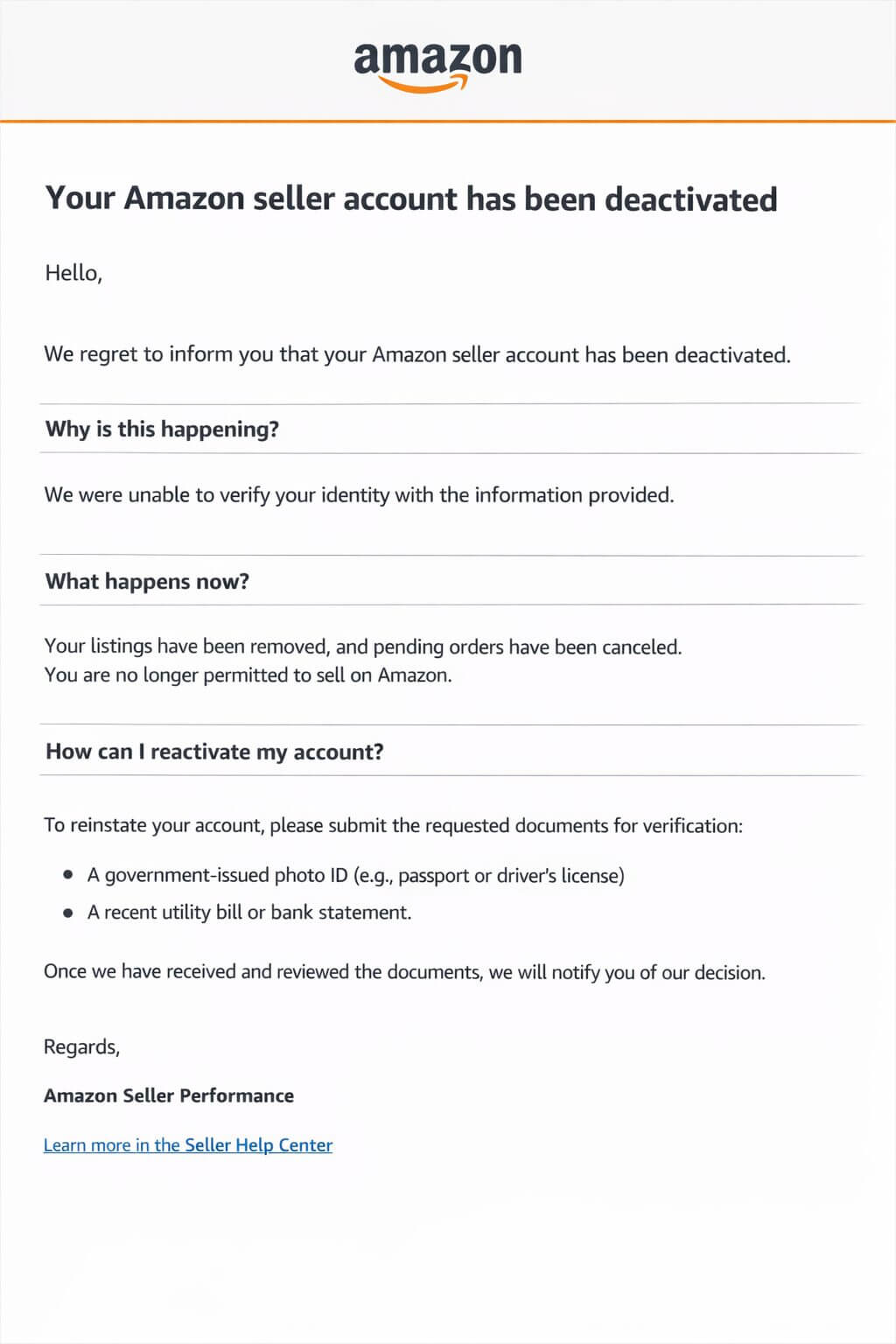
If your Amazon seller account is rejected, do not rush to open a new account or resubmit the same documents. For instance, you might see something like:
“Your Amazon seller account has been deactivated due to issues with identity verification. We were unable to verify the information provided.”
The better approach is to slow down, understand what Amazon is actually flagging, and correct the specific issue before responding.
Therefore, if you are trying to figure out how to fix Amazon seller account rejection, the key is not starting over blindly.
Rather, it is resolving the exact mismatch or compliance issue that caused the rejection in the first place.
Follow these steps in order to retrieve your seller account.
Carefully Review The Rejection Notice
Read the Amazon notice carefully and try to identify what it is actually pointing to such as issues related to identity, address, tax details, banking, or the account setup itself.
Even if the wording feels vague, it usually gives you enough to narrow down where the verification likely failed.
Isolate The Actual Root Cause
Compare the rejection notice with the information and documents you originally submitted.
If you don’t first figure out what actually triggered the rejection, sending the same or slightly edited documents usually leads to the same outcome.
| Pro tip:
Don’t just compare documents at a surface level. Match them exactly the way Amazon reads them. Check for tiny inconsistencies like abbreviations (e.g., “St.” vs “Street”), missing middle names, different date formats, or even slight variations in how your address appears across documents. These small mismatches are one of the most common reasons verifications fail, even when everything looks “correct” to you |
Rebuild Your Support File
Create new, compliant documents that specifically address the issue Amazon flagged.
Ensure all details are up-to-date, easy to read, and perfectly consistent across all your records.
| Pro tip:
Don’t just upload “better” documents. Build a clean, one-directional story. Take one document as your source of truth (usually your bank statement or government ID), and make sure every other document matches it exactly. Same name format, same address line, same spelling, same order. If needed, regenerate documents (like a fresh bank statement or utility bill) so everything aligns perfectly. |
Submit A Clear, Structured Appeal
If Amazon allows an appeal, keep it focused.
Briefly explain what went wrong, what you corrected, and which supporting documents now resolve the issue.
| Pro tip:
Write your appeal like a checklist Amazon can scan in seconds. Don’t explain your story. Just map each fix directly to the issue they flagged.For example: Issue: Unable to verify identity ✔️ Fix: Resubmitted passport with matching name format (including middle name) ✔️ Document: Passport (clear, color scan) Issue: Address mismatch ✔️ Fix: Updated address to match bank statement exactly (no abbreviations) ✔️ Document: Latest bank statement (last 90 days) Keep it this clean and structured. No extra context, no emotional explanation. |
Restart Only If The Original Setup Cannot Be Cleanly Fixed
A restart of the account setup process is generally advisable only when the initial configuration has a fundamental, unfixable flaw.
Examples of such deep-seated issues include:
👉🏼 Using the incorrect legal entity
👉🏼 Having an unresolvable risk of account linkage or
👉🏼 A significant, persistent mismatch in tax and banking information that cannot be corrected through standard revisions
Start Strong With doola Formation & Compliance Services

A lot of Amazon seller accounts get rejected, not because of fraud or breaking the rules, but simply because the legal and financial setup behind the account is either unfinished or messy when they apply.
Amazon’s system needs your identity, tax status, bank setup, and business details to match up perfectly right from the start.
When people rush to open an account before sorting these things out, the verification process hits snags, and the account gets stuck or totally denied.
Here’s where doola comes into the picture. We’re more than just a company formation service.
doola helps you set up the right business structure with accurate paperwork. This makes sure everything is consistent, from your tax records and banking to your marketplace registration.
Sign up to further discuss about doola’s formation and compliance services.
FAQs

How long does Amazon take to verify a new seller account?
In most cases, Amazon completes initial verification within 24 to 72 hours after all required information and documents are submitted.
However, the timeline can extend to several days or even weeks if Amazon requires additional checks such as document resubmissions, live video verification, or manual review.
Delays usually occur when the information provided cannot be immediately reconciled with tax, banking, or identity records.
Can I open an Amazon seller account without an LLC?
Yes. Amazon allows individuals to open a seller account without forming an LLC or corporation.
Many sellers initially register as individuals using their personal identification and tax information.
However, if you plan to operate at scale or sell in international marketplaces, forming a legal entity can simplify tax reporting, banking setup, and long-term compliance.
Why does Amazon reject seller accounts without giving a clear reason?
Amazon rarely provides detailed explanations because revealing the exact triggers could allow fraudulent elements to bypass fraud detection systems.
Instead, rejection notices typically reference verification or identity issues in general terms.
In practice, most rejections are caused by inconsistencies between submitted documents, tax information, banking details, or account environment signals such as IP or device patterns.
Can I create a new account after rejection?
Creating a new account immediately after rejection is usually not recommended.
Amazon retains submission history and may link new accounts to previously rejected ones through identity details, device signals, or banking information.
If the original issue remains unresolved, the new account is likely to be rejected as well. The better approach is to identify the root cause of the rejection and correct it before attempting another registration.
Does using a VPN cause Amazon seller verification failure?
Using a VPN does not automatically cause a verification failure, but it can increase the risk of rejection during onboarding.
Amazon analyzes IP and device signals as part of its verification process. If the registration environment shows inconsistent geolocation or resembles shared infrastructure used by multiple accounts, the system may flag the application for additional scrutiny.
What documents does Amazon require for identity verification?
Amazon typically requires documents that confirm both identity and address. These commonly include:
- A government-issued ID such as a passport, national ID card, or driver’s license
- Proof of address, such as a utility bill or bank statement
- A valid credit card for billing verification
- A bank account for receiving payouts
- Tax information such as a TIN or EIN depending on the seller’s structure
In some cases, Amazon may also request business registration documents or conduct live video verification.
How can international sellers avoid Amazon verification issues?
International sellers can reduce verification issues by ensuring that the core elements of their setup are consistent before applying.
This includes selecting the correct marketplace, confirming the appropriate tax form path, using banking that supports payouts in that marketplace, and ensuring the legal name used across identity, tax, and banking documents matches exactly.
Most verification delays occur when these structural elements do not align.
PakarPBN
A Private Blog Network (PBN) is a collection of websites that are controlled by a single individual or organization and used primarily to build backlinks to a “money site” in order to influence its ranking in search engines such as Google. The core idea behind a PBN is based on the importance of backlinks in Google’s ranking algorithm. Since Google views backlinks as signals of authority and trust, some website owners attempt to artificially create these signals through a controlled network of sites.
In a typical PBN setup, the owner acquires expired or aged domains that already have existing authority, backlinks, and history. These domains are rebuilt with new content and hosted separately, often using different IP addresses, hosting providers, themes, and ownership details to make them appear unrelated. Within the content published on these sites, links are strategically placed that point to the main website the owner wants to rank higher. By doing this, the owner attempts to pass link equity (also known as “link juice”) from the PBN sites to the target website.
The purpose of a PBN is to give the impression that the target website is naturally earning links from multiple independent sources. If done effectively, this can temporarily improve keyword rankings, increase organic visibility, and drive more traffic from search results.